Business Flows
Customer Discovery Flow
Endpoint:
GET /api/restaurants/available-restaurants
GET /api/restaurants/available-restaurants-dashboard
Flow:
- The backend resolves user coordinates from request
lat/lngor from the authenticated user's active delivery location. - Redis GEO key
restaurant:locationsfinds nearby branch IDs within the system max radius of 8 km. - If no nearby branches exist, the endpoint returns an empty page quickly.
RestaurantQueryCacheServicequeries restaurants using dynamic sorting.- Branches are filtered to active, open, manager-assigned branches inside the Redis candidate set.
RestaurantDtoMappercallsPricingServiceto calculate delivery info.- Only deliverable branches are included.
- If a restaurant has more than one deliverable branch, the best branch is selected based on sort.
Dashboard endpoint behavior:
- Always fetches
normal. - Only fetches
topRated,fastest, andtrendingwhen the initial normal response contains at least 10 branch entries.
Sort values:
default
rating
prep_time
time
delivery_time
trending
popularity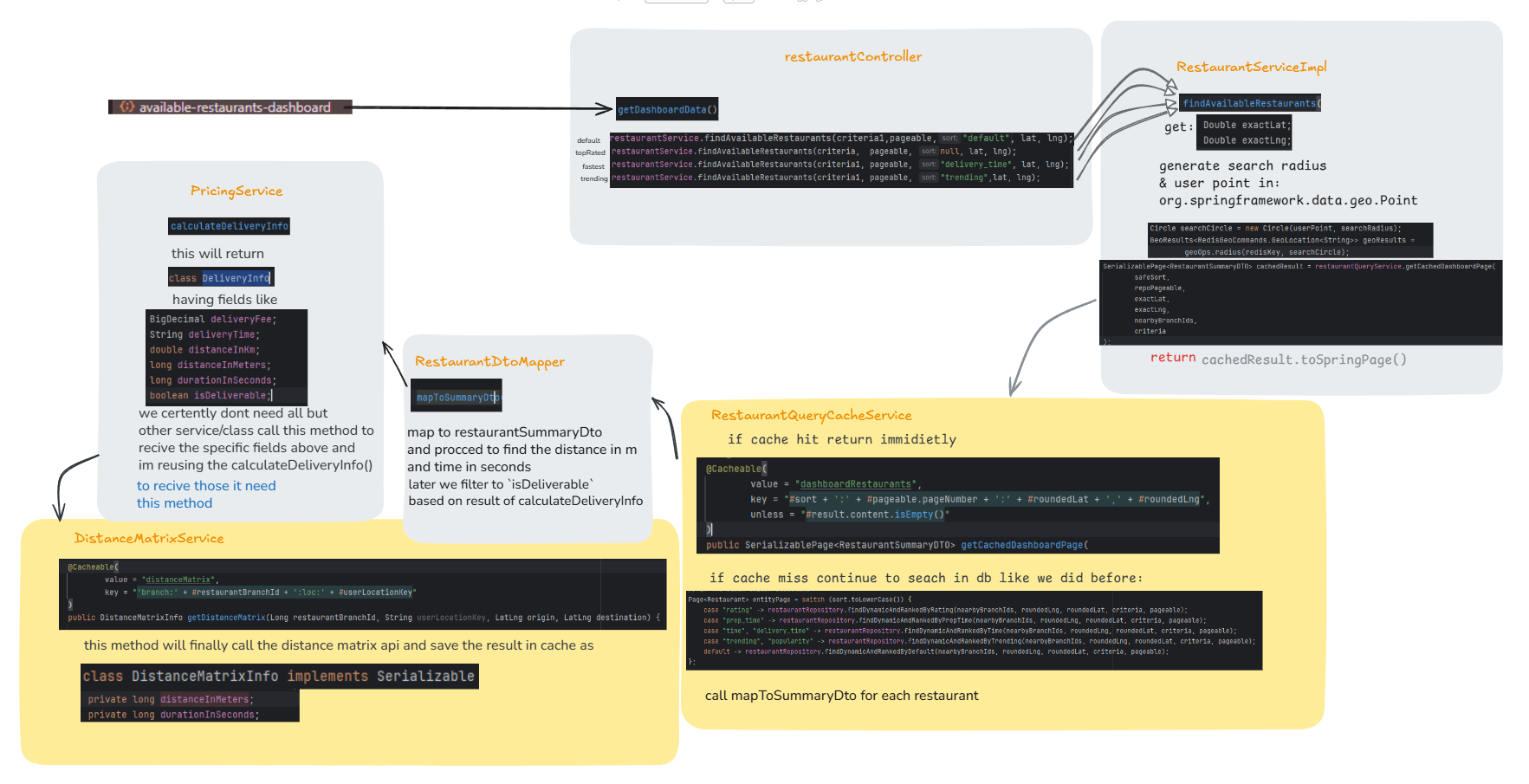
Delivery Pricing and Time Flow
Source:
PricingService
DistanceRoutingManager
GoogleDistanceMatrixService
OpenRouteDistanceMatrixService
Inputs:
- branch coordinates,
- user coordinates,
- branch average preparation time,
- branch delivery radius,
- routing provider.
Deliverability requires:
- branch is not closed,
- a valid route exists,
- road distance is within
branch.deliveryRadiusInKm.
Delivery price tiers:
| Road distance | Delivery price |
|---|---|
<= 1.5 km | 80 |
<= 3.0 km | 150 |
<= 5.0 km | 200 |
> 5.0 km | 300 |
Delivery time:
avg prep time + route travel time + 5-10 minute courier bufferThe result is rounded to the nearest 5 minutes and formatted like:
25-30 minMenu Management Flow
The backend separates restaurant-level menu definition from branch-level selling configuration.
Manager creates:
- master menu item (
Menu), - menu category (
Category), - option groups (
OptionGroup), - option variants (
OptionVariant).
Branch manager controls:
- branch-specific menu item price,
- branch-specific availability,
- branch-specific highlighted flag,
- branch-specific option variant overrides through
BranchOptionConfig.
This means the same master item can be sold differently by each branch.
Example:
Restaurant: Tony Pizza
Master menu: Pepperoni Pizza
Branch A: price 900, available true
Branch B: price 980, available false
Option example:
Option group: Choose sauce
minSelection: 0
maxSelection: 2
Variant: Garlic sauce, recommendedPrice: 50
Branch override: Blloku branch, Garlic sauce, priceOverride: 80, isAvailable: true
Cart Flow
Endpoint group:
/api/cartAdd-to-cart steps:
- Validate option selections against
minSelectionandmaxSelection. - Load the
BranchMenuItem. - Reject unavailable branch menu item.
- Get or create the customer's cart for that branch.
- Load effective prices for selected variants, including branch overrides.
- Calculate final
pricePerUnit. - If an identical cart line already exists with the same branch menu item and same selected variants, increment its quantity.
- Otherwise create a new cart item and variant joins.
- Return a rebuilt cart view.
Important rule:
Customers add branchMenuItemId, not menuId.That is required because real price and availability live on BranchMenuItem.
Checkout Preview Flow
Endpoint group:
/api/checkoutCheckout preview:
- Load current user.
- Load branch cart.
- Resolve selected payment method:
- cart selected method if present,
- otherwise user's last selected payment method,
- otherwise branch-supported fallback.
- Build order quote:
- subtotal,
- service fee,
- tip,
- delivery fee,
- total,
- delivery time/distance.
- Validate delivery zone.
- Validate branch is open.
- Validate minimum order amount.
- Return checkout DTO.
Service fee rule:
5% of subtotal, capped at 150Additional zone rule:
checkout blocks if actual route exceeds branch radius after applying current tolerance logicPlace Order Flow
Endpoint:
POST /api/orders/checkout/{branchId}Flow:
- Load current customer.
- Load active customer delivery location.
- Load cart for branch.
- Check for existing pending PokPay order for same customer and branch.
- If existing order has same
cartHashand latest payment link is still valid, return the same payment URL. - If same cart but payment expired, mark old payment expired and generate a new PokPay link.
- If cart changed, mark old order
FAILEDand paymentABANDONED, then continue. - Validate item and variant availability.
- Build order quote using checkout service.
- Create order, order items, variant snapshots, delivery address snapshot, totals, driver earnings, and
cartHash. - If payment method is
POK, create PokPay SDK order and return payment URL. - If payment method is not
POK, clear cart, publish order event, increment daily branch order count, return order.
Driver earnings rule:
if deliveryPrice <= 80: driver receives deliveryPrice
else: driver receives 50% of deliveryPrice
driver also receives the full tip
PokPay Payment Flow
Payment creation:
- Backend logs in to PokPay using
keyIdandkeySecret. - Backend creates SDK order under
merchantId. - Backend stores:
- transaction ID,
- payment URL,
- created date,
- expiry,
- amount,
- gateway
POK, - payment status
PENDING_PAYMENT.
- Client redirects user to PokPay confirmation URL.
Webhook:
POST /api/v1/payments/webhookWebhook processing:
- Find order by payment transaction ID.
- If order already has
COMPLETEDpayment status, return immediately. This makes the webhook idempotent. - If order was marked
FAILEDby cleanup but payment arrives late, set order status back toINITIALIZED. - Set order and payment status to
COMPLETED. - Clear customer cart for the branch.
- Increment branch daily order count.
- Publish
OrderSavedEventfor WebSocket dashboards.
Payment cleanup:
POST /api/internal/jobs/payment-cleanupThis marks expired payments and abandoned orders through repository update queries.
Order Status Flow
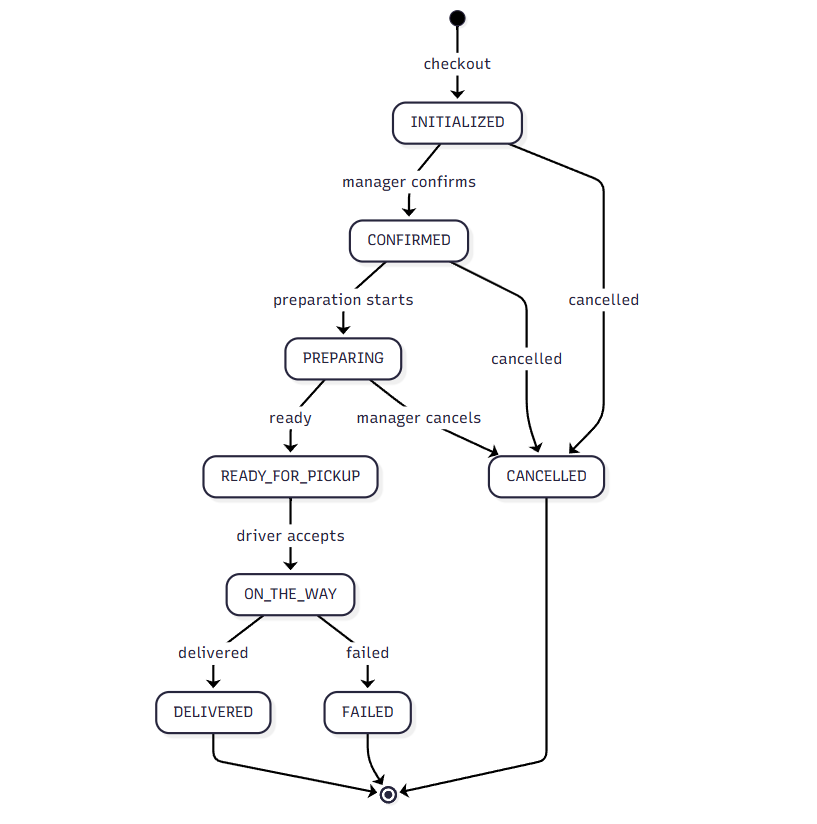
Current order statuses:
INITIALIZED
CONFIRMED
PREPARING
READY_FOR_PICKUP
ON_THE_WAY
DELIVERED
CANCELLED
FAILED
The controller accepts a partial OrderDTO with either orderStatus or paymentStatus. It rejects requests that send both or neither.
Delivery Driver Transitions
Delivery users can set:
ON_THE_WAY
DELIVERED
FAILED
Valid transitions:
| From | To |
|---|---|
READY_FOR_PICKUP | ON_THE_WAY |
ON_THE_WAY | DELIVERED |
ON_THE_WAY | FAILED |
If the order is unassigned and a delivery user updates it, the processor can assign the current driver. If already assigned to another driver, it rejects the update.
Delivery users can update payment status only for non-POK payments, and only to:
COMPLETED
FAILED
Customer Transitions
Customers can only request:
CANCELLEDThe order must belong to that customer. Customers cannot change payment status.
If cancellation happens while payment is incomplete, the backend sets payment status to:
CANCELEDand updates incomplete payment rows too.
Branch Manager and Manager Updates
Branch manager:
- must manage the order's branch.
Manager:
- must own the order's restaurant.
The current validator enforces ownership but does not restrict branch manager/manager target statuses as tightly as delivery transitions. If stricter production state-machine rules are needed, extend OrderStatusValidator.
Delivery Assignment Flow
Endpoint:
GET /api/orders/unassigned-orders
PUT /api/orders/assign-order-delivery/{orderId}
Unassigned pool includes orders where:
deliveryPersonis null,- status is one of:
CONFIRMED
PREPARING
READY_FOR_PICKUP
When a driver accepts:
- Backend verifies role
DELIVERY. - Backend rejects if order is already assigned.
- Backend sets
deliveryPersonto current driver. - Backend saves order.
The WebSocket event system removes the order from other drivers' global pool when an order transitions out of unassigned criteria.
WebSocket Order Update Flow
Source event:
OrderSavedEventPublished when:
- order status changes,
- non-POK order is placed,
- PokPay webhook confirms payment.
Handler:
WebSocketController.handleOrderSaveEventBroadcasts:
- Branch dashboard:
/topic/branch.{branchId}.manager- Delivery global unassigned pool:
/topic/delivery.global.unassignedwith wsAction:
ADD
REMOVE- Personal driver queue:
/user/queue/updatesLive Driver Location Flow
Endpoint:
POST /api/delivery-location/locationPayload:
{
  "latitude": 41.3275,
  "longitude": 19.8189
}
Flow:
- Kotlin delivery app authenticates as delivery user.
- App sends current coordinates.
- Backend gets current user ID.
- Backend writes payload to Redis:
driver_loc:{driverId}- TTL is one hour.
Current limitation:
- There is no completed endpoint that reads these Redis keys for customer/admin frontend display.
LocationSubscriberexists for Redis pub/sub topicdriver_locations, but the write endpoint currently uses RedisSET, notPUBLISH.LocationSubscribercurrently attemptsmessagingTemplate.convertAndSend(location)without a destination, so it needs completion before use.
Recommended next design:
- Keep
driver_loc:{driverId}as latest-position cache. - Add
GET /api/delivery-location/driver/{driverId}for authorized admin/customer/order tracking. - Publish to
/topic/orders.{orderId}.driver-locationor/user/queue/driver-locationwhen a driver with active order updates location. - Include authorization checks so customers can only see the driver for their active order.
Refund Flow
Customer refund request:
POST /api/payment/ask-for-refund/{orderId}Rules:
- Cash on delivery cannot request refund.
- Order must be
CANCELLED. - Order must belong to customer.
- Order payment and completed payment row become
TO_REFUND.
Branch manager refund:
POST /api/payment/{paymentId}/refund
POST /api/payment/refund/{paymentId}
Rules:
- Role-scoped to branch/restaurant ownership.
- Delivery drivers are forbidden.
- Calls PokPay refund API.
- Marks payment and order payment status
REFUNDED.
There are currently two branch-manager refund endpoints. Keep one canonical endpoint later.
Analytics Flow
Analytics endpoints build a role-scoped filter:
- Admin can request target branch or target restaurant.
- Manager is forced to their restaurant.
- Branch manager is forced to their branch.
- Delivery is denied restaurant analytics but can access delivery-specific counts and earnings.
Metrics include:
- branch revenue,
- total revenue,
- successful orders,
- unique customers,
- popular items,
- monthly revenue,
- daily revenue,
- assigned preparation order count for delivery,
- delivery earnings.