FOOD FUSION DOCUMENTATION
basic flow img
basic flow url
basic flow ai summary
basic flow ai summary 2
In this documentation, the focus is not on the technical rules or structure of writing documentation, but rather explaining the system itself. Im trying to write this short and concise.
Writing time: 1/1/2026
I will write this in story form.
The Discovery Page
How is the discovery page frontendUrl/discovery fetched. Discovery page is arguably the hardest part in building the software. I will start by explaining not in code but in logic. Many users (“CUSTOMERS”) are looking for food to eat, and the discovery’s job is to show only available restaurant branches ex.: KFC (this is the restaurant) Deliorgji (this is the restaurant branch or child of the restaurant). Those branches cards will contain info such total time when the order arrive, distance of the branch, delivery price and the name of restaurant with branch location.\
What defines available
- When Branch set the delivery range to example: 5km and the user must be within that distance (this is redis circle and not the actual distance of the delivery person that is generated from the distance matrix api. If the distance of the delivery is higher than example: 5km than the branch will show but user can't continue to checkout.)
- The branch is active (not closed).
- It has a manager assigned.
- Restaurant Branch must be open
- Restaurant must have a manager
- Restaurant Branch must have at least one payment method so customers can pay.
getDashboardData() This endpoint is the highest level of abstraction, and we will go down level by level.
Firstly, lets understand how the restaurant branches are picked based on distance because this is crucial:
The problem: A customer is located in Astir and want to order from restaurant branches and he need to see available branches in his area. We need accomplish the first point of the available resturants by finding only restaurants within the range. How is one example: 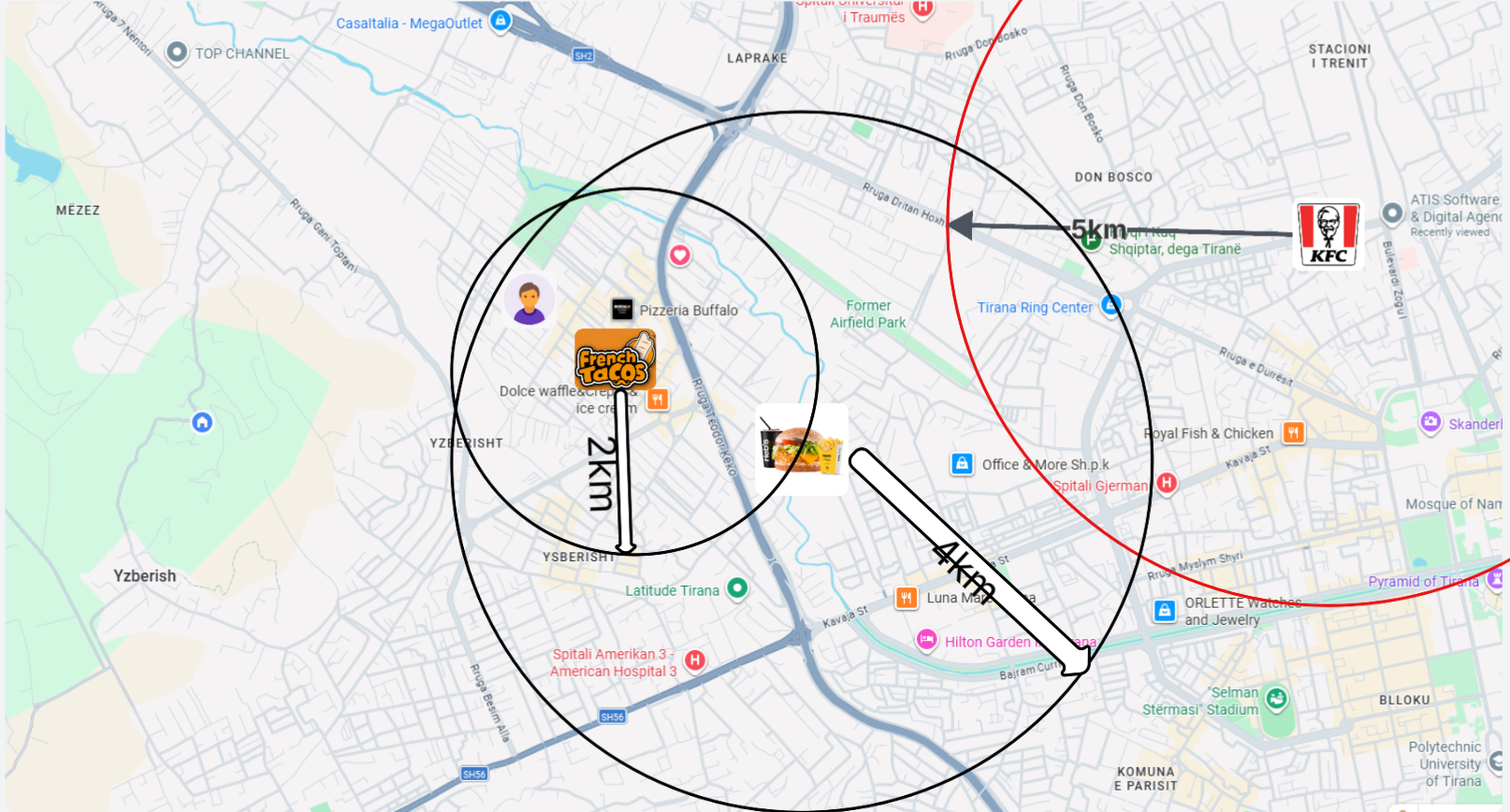
in the image we can see that the available restaurants are "FrenchTacos" and "Heb's".
How to find this programmatically?
What we have:
User Location: Stored in the delivery_location table as simple double precision columns (latitude, longitude).
    latitude      double precision not null,
longitude double precision not null- Restaurant Location: Stored in the
restaurant_locationstable using thePOINT(Geometry) format.
@Column(columnDefinition = "geography(Point,4326)")
private Point location;
//sql->    location                 geography(Point, 4326),
//Code 4325 mean: WGS84 (World Geodetic System 1984) which is a globally accepted,
//Earth-centered, Earth-fixed coordinate system and geodetic datum.
Why restaurant location is saved in POINT format and not double like the user location?
Let say both are stored in double precision, in this scenario we would use haversine formula.
Why restaurant location is saved in POINT format and not double like the user location?
Let say both are stored in double precision, in this scenario we would use haversine formula to calculate distance between the two points. 
This would be generally fine but when the app scales, the calculations would take a lot of server processing power and would slow the app, O(N) (Linear Complexity) ->database must perform a Full Table Scan on every single row in the restaurant table to see if it matches the criteria.
Secondly every time the user refreshes the page or a neighbor opens the app, we would expect the app to show identical results if timing is relatively short but this approach requires caching and this method does not provide it.
The solution
is to use redis geospatial indexing with postgis extension.
The real reason we use geography(Point, 4326) is because it allows us to use GiST (Generalized Search Tree) indexes. When you index a geography column, the database organizes the points into a mathematical tree structure based on bounding boxes. When a user opens the app, the database doesn't calculate the distance to every restaurant. Instead, it looks at the index, instantly discards whole branches of the tree that are nowhere near the user, and only calculates the exact distance for the handful of restaurants that are actually close. This reduces the search complexity from O(N) to roughly O(log(N)). How this works When server start up this method is triggered
@PostConstruct
public void rebuildGeoIndexOnStartup() {
    ...
    geoOps.add(REDIS_GEO_KEY, locations);
}2026-05-09T13:07:18.431+02:00 INFO 25576 --- [FoodApp] [ main] c.t.F.r.service.BranchServiceImpl : --- Rebuilding Redis index on startup ---Since Redis is an in-memory store (volatile), we cannot assume it holds data when the server restarts. We must "hydrate" or "warm up" the cache immediately upon startup.
What the above method does is:
- Fetch all restaurant branches from the database.
- Clear the old cache.
- Convert the JTS Point (SQL) to Spring Geo Point (Redis).
- Push the converted data to Redis.
This is also implemented when a new restaurant branch is added or updated. Now that we have the cache ready, we can use thegeoRadiusmethod to find nearby branches.
Let's go back to the initial methodgetDashboardData(). As I will explain below this method is a wrapper ofavailable-restaurants. Let see how we can fetch the distance details for each branch and get the actual available restaurants. Lets ignore the sorting and filtering for now and focus more on finding the restaurants
inside the method findAvailableRestaurants is this code
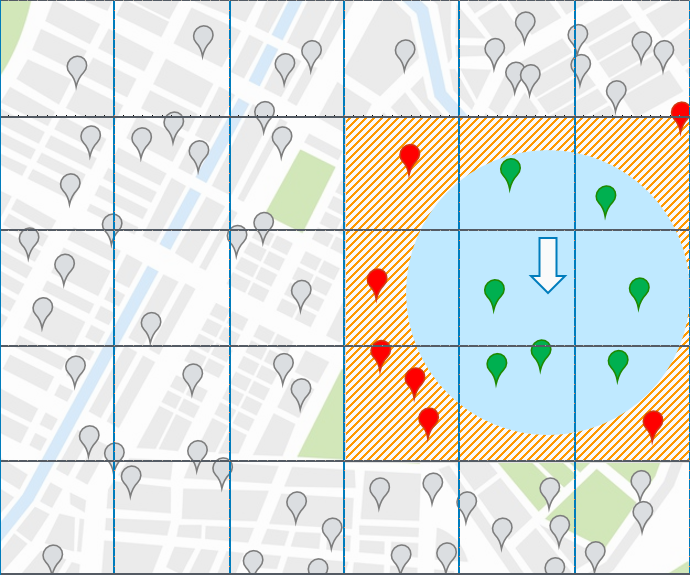
In this image the sqares are sqares set by redis and size is automaticlly decided based on the searchCircle. REDIS initially searches for the 9 sqares and is very fast than decides what to keep depending on the circle. At the end it returns GeoResults, which is a list wrapper containing all the Branch IDs (name string) that were found. 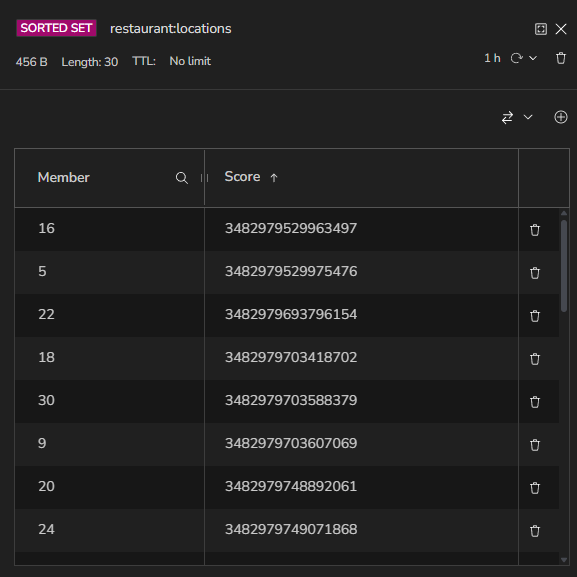
We're grabbing the IDs from the geo-search results and converting them into a list of Longs "nearbyBranchIds".
The scores (e.g., 3482979529963497) are Redis GEO encoded integers — specifically 52-bit geohash integers that Redis uses internally to store coordinates in a Sorted Set.
How it works\
- When you call geoOps.add(REDIS_GEO_KEY, locations), Redis:
- Takes the (longitude, latitude) point
- Encodes it into a 52-bit integer geohash
- Stores it as the score in the Sorted Set
How it returns the restaurant branches after getting the IDs
Now that we have the Sorted Set we are not finished because there are more validations that we have to do like to apply like what we discussed in the beginning. Also, we need the restaurant card info like
public class RestaurantSummaryDTO {
    private Long id;
    private String name;
    private String description;
    private String coverImageUrl;
    private String profileImageUrl;
    private boolean isPromoted;
    private LocalDateTime createdAt;
    private List<RestaurantCategoryDTO> categories;
    private List<BranchSummaryDto> branches;
}
BranchSummaryDto
//BranchSummaryDto is the hardest part that we will return because we will
// generate from other functions and all the values in RestaurantSummaryDTO are located in db.
    private Long id;
    private String address;
    private String phoneNumber;
    private boolean isActive = true;
    private double latitude;
    private double longitude;
    private double distanceInKm;
    private String deliveryTime;
    private BigDecimal deliveryPrice;
    private BigDecimal rating;
    private Integer roundedReviewCount;
    private Integer minOrderAmount;
    private Integer dailyOrderCount;
First lets get the restaurants & branches from the repository.
User can have many filters at the same time for example they can filter for both is new and min order amount so we handle this at repository layer.
In contrary the sort can only be one at the time and we handle this at service layer, we use switch for this.
        switch (String.valueOf(sort).toLowerCase()) {
            case "rating":
                entityPage = restaurantRepository.findDynamicAndRankedByRating(
                        nearbyBranchIds, userLongitude, userLatitude, criteria, repoPageable);
                message = "Restaurants sorted by rating retrieved successfully.";
                break;

            case "prep_time":
                entityPage = restaurantRepository.findDynamicAndRankedByPrepTime(
                        nearbyBranchIds, userLongitude, userLatitude, criteria, repoPageable);
                message = "Restaurants sorted by prep time retrieved successfully.";
                break;

            case "default":
            default:
                entityPage = restaurantRepository.findDynamicAndRankedByDefault(
                        nearbyBranchIds, userLongitude, userLatitude, criteria, repoPageable);
                message = "Restaurants retrieved successfully.";
                break;
        }
When a search request comes in, the system starts with a master query that gathers all valid, nearby restaurants and filters them based on the user’s specific criteria. Before sending the results back, the code dynamically decides how to rank them—prioritizing either promoted spots, high ratings, or fast prep times—by attaching the correct sorting instruction to the end of that master query. example in repository
    @Query(value = BASE_SELECT + BASE_WHERE_DYNAMIC + BASE_GROUP_BY + ORDER_BY_DEFAULT, countQuery = BASE_COUNT, nativeQuery = true)
    Page<Restaurant> findDynamicAndRankedByDefault(
            @Param("branchIds") List<Long> branchIds, @Param("userLon") double userLon, @Param("userLat") double userLat,
            @Param("criteria") RestaurantFilterCriteria criteria, Pageable pageable
    );

    // Sort by Rating
    @Query(value = BASE_SELECT + BASE_WHERE_DYNAMIC + BASE_GROUP_BY + ORDER_BY_RATING, countQuery = BASE_COUNT, nativeQuery = true)
    Page<Restaurant> findDynamicAndRankedByRating(
            @Param("branchIds") List<Long> branchIds, @Param("userLon") double userLon, @Param("userLat") double userLat,
            @Param("criteria") RestaurantFilterCriteria criteria, Pageable pageable
    );
base dynamic contain all validation,filtering
This will return a Pagable Restaurant object which will be converted to RestaurantSummaryDTO in our mapper.
Generate BranchSummaryDTO
]()Now we need to generate BranchSummaryDTO inside the mapper. This is done by other helper services like calculateDeliveryInfo inside PricingService and pricing service uses other helper methods like DistanceMatrixService which makes a request to DistanceMatrixApi for distance in meters, which uses other methods to reutrn this DeliveryInfo dto.
public class DeliveryInfo {
    private final BigDecimal deliveryFee;
    private final String deliveryTime;

    private final double distanceInKcm;
    private final long distanceInMeters;
    private final long durationInSeconds;

    private final boolean isDeliverable;
}
Building the dashboard
The dashboard is inspired by Lieferando, where there are three horizontal carousels:
fastesttrendingtopRateddefault(contains all available venues with infinite scroll and no sorting or filtering)
If a user decides to manually apply a filter, sorting option, or select a specific category, only the default section will be shown.
There is no rule that a venue must appear only once. For example, KFC Astir could appear in both fastest and topRated. Also, there can be multiple venues from the same restaurant chain.
Initially, I created an endpoint in Spring to accept and return 4 different Page<RestaurantSummaryDTO> objects, but that turned out to be a bad idea for two reasons:
- Higher latency because there were 4 different requests.
- More importantly, there was an issue where caching would not work because all 4 requests arrived at the same time and resulted in a cache miss, causing 4 separate Distance Matrix API calls for a single calculation.
I was not worried at the beginning because I had a $300 budget from Google Cloud credits. However, after the 3 months ended and I web-scraped Wolt with many restaurants, I realized this could become a major problem in a real-world application.
Pricing is around $5–$10 per 1,000 elements, and the cost can increase very quickly.
see more
Infinite scroll
Initial Load (page=0): The frontend calls /available-restaurants-dashboard. It gets the carousels and the first 10 items of the normal list.
Scrolling (page=1, 2, 3...): The frontend completely ignores the dashboard endpoint. Instead, it calls your existing standard endpoint: /available-restaurants?sort=default&page=1&size=10.
But this could be more optimized (TODO) MAYBE
There is a lot of duplicate of restaurant branches inside the json for example
"trending": {
            "content": [
                {
                  "id": 5,
                  "name": "Yogurteria",
                          ......
                }
],
"fastest": {
            "content": [
            {
              "id": 5,
              "name": "Yogurteria",
              ......
            }
"trending": {
            "content": [
            {
            "id": 5,
            "name": "Yogurteria",
            ......
            }
}
you can see Yogurteria appear 3 times and this is 40 rows of json per restaurant * 3 = 120 rows but I can reduce it to only 40 rows.